
What can you do with production orders in SAP Business One?
2026.06.09
What is a production order in SAP Business One?
The production management module in SAP Business One includes a dedicated production order function. In practice, the distinction between terms like “production order” and “production instruction” (or “work order”) is often blurred, though broadly speaking, “production order” leans towards management and planning, whilst “production instruction” tends to refer to specific operational steps. The production order within SAP Business One falls into the former category.
Within the production order screen, you can clearly record exactly which products are being manufactured, in what quantities, and by what deadline. It also allows you to specify which materials are required, how many are needed, and where they will be used.
Because production orders act as the starting point that links a continuous stream of data, such as production output, costs, and inventory movements, it is no exaggeration to say they are the most critical feature of the entire production management module.
Key features of production orders
SAP Business One’s production orders are flexible enough to support a wide range of production methods, from Engineer-to-Order (ETO) right through to Sale-to-Stock (STS).
Regardless of the production method to be used, all actual performance figures are reflected in real time on the production order’s “summary” tab.
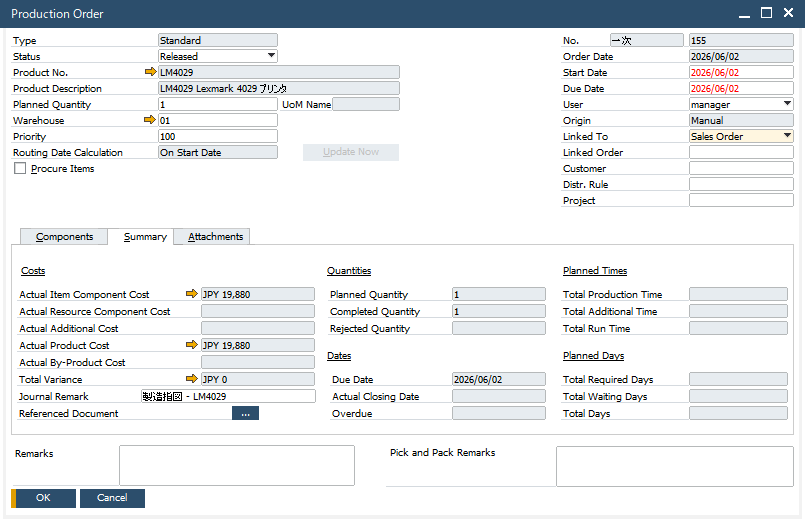
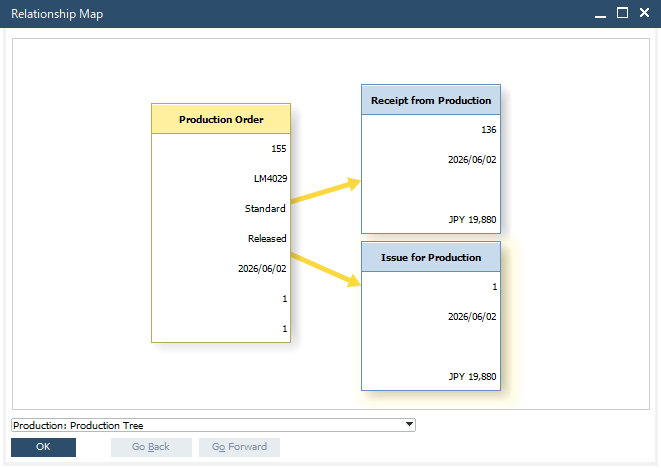
Additionally, the relationships between connected data can be visualised directly from the production order screen using the “Relationship Map” feature, giving users a clear, graphical overview of how everything ties together.
The benefits of using production orders
Among companies looking to implement SAP Business One, a common requirement that comes up regularly is the need to sharpen cost control accuracy.
To address this requirement, we usually delve into two main areas: planning and actual performance. Regarding planning accuracy, the root cause of the issue can often be described as an inability to define production orders with sufficient precision.
For example, the difficulties in converting from an Engineering Bill of Materials (EBOM) to a Manufacturing Bill of Materials (MBOM) can result in production orders that do not reflect reality accurately enough. To deal with this, we often take a step-by-step approach to improve accuracy. This involves clarifying the relationship between the EBOM and the MBOM, and reviewing how each component’s master data is registered, ensuring that the necessary line items are correctly defined within the production orders.
Resulting in the enhancement of the level of detail captured within the production orders, which naturally leads to far more accurate cost data.
Expect improved accuracy in cost control and inventory management
By using production orders in SAP Business One, you can significantly improve the accuracy of both cost control and inventory management. However, there is no need to have the perfect system from the very start of the implementation.
As your team gets more familiar with the system, it is possible to refine your production management approach step by step, for instance by analysing the gap between planned and actual cycle times and making targeted improvements.
If you are interested in implementing the SAP Business One production management module, or would like to learn more about production orders, please do not hesitate to get in touch with us.