
What can you do with BOMs in SAP Business One?
2026.04.13
Bill of Materials: Terminology
In this article, we take a look at the Bill of Materials functionality within SAP Business One.
The information that describes the relationship between a finished product and its components (or items) goes by different names depending on the industry. Even within manufacturing, you will encounter terms such as Bill of Materials, BOM, batch record (or batch sheet), recipe, and formula, among others. For the purposes of this article, and to keep things consistent with SAP Business One’s own terminology, we will refer to all of these simply as “Bill of Materials”.
Key features of the Bill of Materials
Let us take a look at the Bill of Materials screen in SAP Business One.
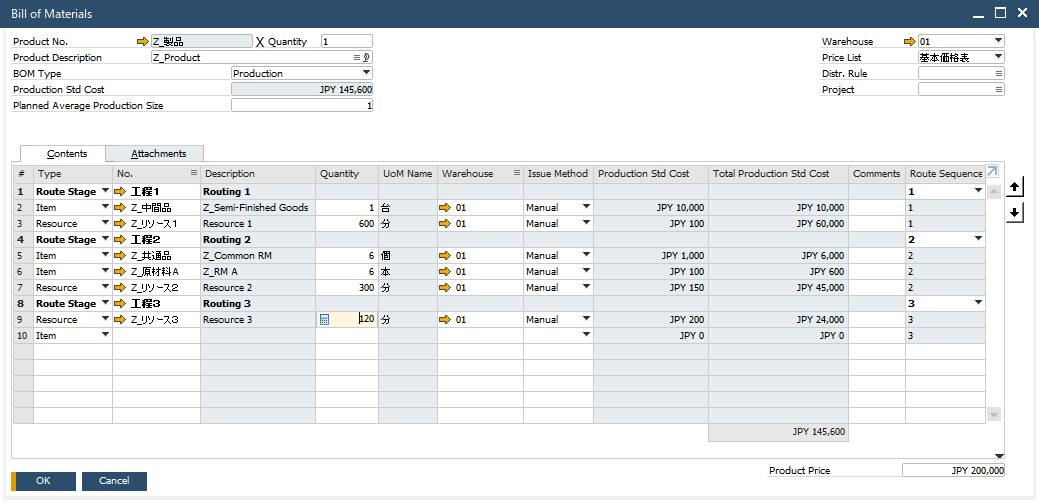
To give a practical example of what can be defined within this screen, consider the following:
- 1 finished product (“Product”) has 3 associated processes/route stages (“Routing”).
- “Routing 1” requires “Semi-Finished Goods” and “Resource 1”.
- “Routing 2” requires common items/raw materials (“Common RM”), raw materials (“RM A”) only used for this product, and “Resource 2”.
- “Routing 3” requires “Resource 3”.
- The planned cost of the finished product is 145,600 JPY.
- The selling price of the finished product is 200,000 JPY.
Beyond this, the “Attachments” tab allows you to manage relevant documents related to the Bill of Materials, making it straightforward to centralize all related information in one place.
There are also a number of additional options available through configuration changes, such as the handling of by-products and adjusting the number of decimal places used for quantities. This flexibility means that Bills of Materials can be structured in a variety of ways to suit different operational needs.
If the standard fields available out of the box do not quite align with the information your business needs to capture, this is where one of SAP Business One’s most notable strengths comes into play, namely how straightforward it is to customize, to the extent that it can be handled entirely in-house. System administrators are free to add whichever fields are required, allowing the system to be tailored to your processes and the overall quality of your data to be continuously improved.
Integration with other features
The data defined within the Bill of Materials feeds directly into other areas of the system. It is used in Production Orders, which serve as the formal instruction to manufacture, as well as in MRP runs carried out for production planning purposes.
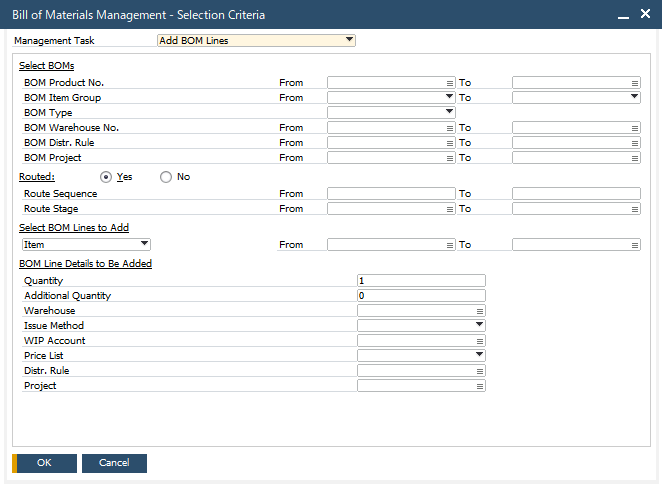
If you need to make changes to an existing Bill of Materials, the Bill of Materials Management function provides a convenient way to do so in bulk, whether that means updating rows that meet a specific set of criteria or adding entirely new ones.
Planned enhancements to the Bill of Materials functionality
This article has provided a broad overview of the Bill of Materials functionality available in SAP Business One.
The system is already well equipped to support a wide range of manufacturing industries, and further improvements are planned for upcoming versions, including enhancements to features such as version control, which are commonly required in production management environments.
If you would like to find out more about what the functionality can do, get a clearer picture of how your own bill of materials structure might translate into the system, or learn how other businesses already using it have approached their setup, please feel free to get in touch with us.